
FlowEra KB provides fast full-text search across all articles in your workspace. Results appear instantly with highlighted matching fragments.
Opening Search
⌘F— search within the current article⌘K— global search across the entire knowledge base- Search field in the sidebar — search page titles
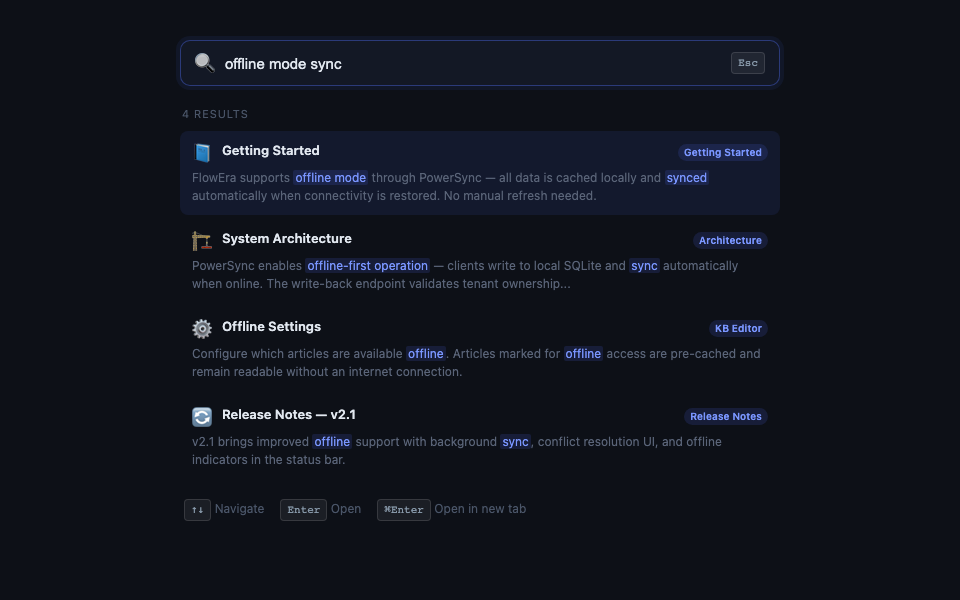
Full-Text Search
By default, search covers the content of all articles, including:
- Headings and paragraphs
- Content inside toggle blocks
- Tables
- Code blocks (by language name and content)
- Image captions
Search Results
Each result shows:
- Article title and KB section
- Snippet with highlighted search words
- Category icon (section)
Navigation: ↑↓ to move, Enter to open, ⌘Enter to open in a new tab.
Filters
After typing a query, filters are available:
- Section — search only a specific part of KB
- Author — articles by a specific team member
- Date — modified within a time range
- Tag — by article tags
Query Syntax
| Query | Result |
|---|---|
api auth | Articles containing both «api» and «auth» |
"api authentication" | Exact phrase |
api -graphql | Contains «api», does not contain «graphql» |
title:roadmap | Only in page titles |
author:maria | Articles by user Maria |
Semantic Search
The AI Search button enables semantic search — it understands the meaning of your query, not just keywords. For example, searching «how to work without internet» will find articles about offline mode.
Semantic search is powered by vector embeddings and may be 1–2 seconds slower than regular search.