
Webhooks send HTTP notifications to your server when the knowledge base changes. Use them to integrate with Slack, CI/CD, external systems, and automation pipelines.
Creating a Webhook
Go to KB Settings → Webhooks → + Add webhook.
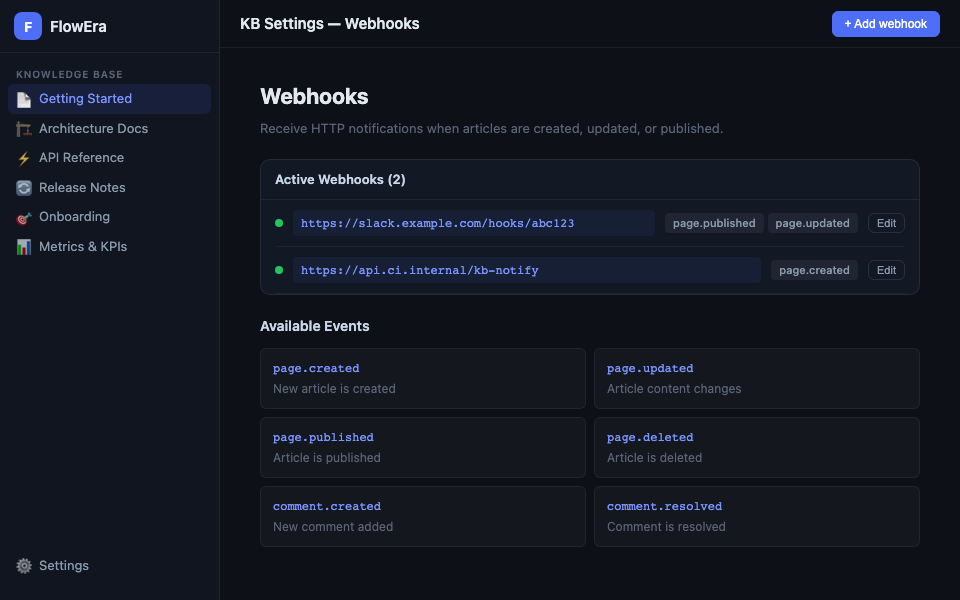
Fill in:
- URL — your server endpoint
- Events — select one or more events
- Secret — for signature verification (optional but recommended)
Event Reference
| Event | Fires when |
|---|---|
page.created | A new page is created |
page.updated | Article content changes |
page.published | Article is published |
page.deleted | Page is deleted |
page.archived | Page is archived |
comment.created | A new comment is added |
comment.resolved | A comment is marked as resolved |
Payload Format
{
  "event": "page.updated",
  "timestamp": "2025-03-24T10:30:00Z",
  "data": {
    "page_id": "page_abc123",
    "title": "System Architecture",
    "url": "https://app.flowera.io/kb/page_abc123",
    "updated_by": {
      "id": "user_xyz",
      "name": "Alex Petrov",
      "email": "alex@company.com"
    },
    "section": "Architecture"
  },
  "workspace_id": "ws_123"
}
Signature Verification
If a Secret is set, each request includes an X-FlowEra-Signature header:
X-FlowEra-Signature: sha256=a1b2c3d4...Verification in Go:
mac := hmac.New(sha256.New, []byte(secret))
mac.Write(body)
expected := hex.EncodeToString(mac.Sum(nil))
if signature != "sha256="+expected {
    // Reject request
}
Retry Behavior
If your endpoint is unavailable, FlowEra retries:
- 3 attempts with 1 min, 5 min, 30 min delays
- After 3 failures, the webhook is marked «Failed»
- The workspace admin receives a notification
Debugging
Each webhook card has a Logs tab with the last 100 requests. Each entry shows:
- Timestamp
- Event
- HTTP response status
- Response time (ms)
- Request body (for resending)
The Send test button sends a test payload to verify your setup.