
Relations let you explicitly connect thematically related articles. Unlike regular text links, relations are structured metadata shown in a dedicated panel.
Relations Panel
Open the right panel with the «Relations» button in the article toolbar or press ⌘⇧R.
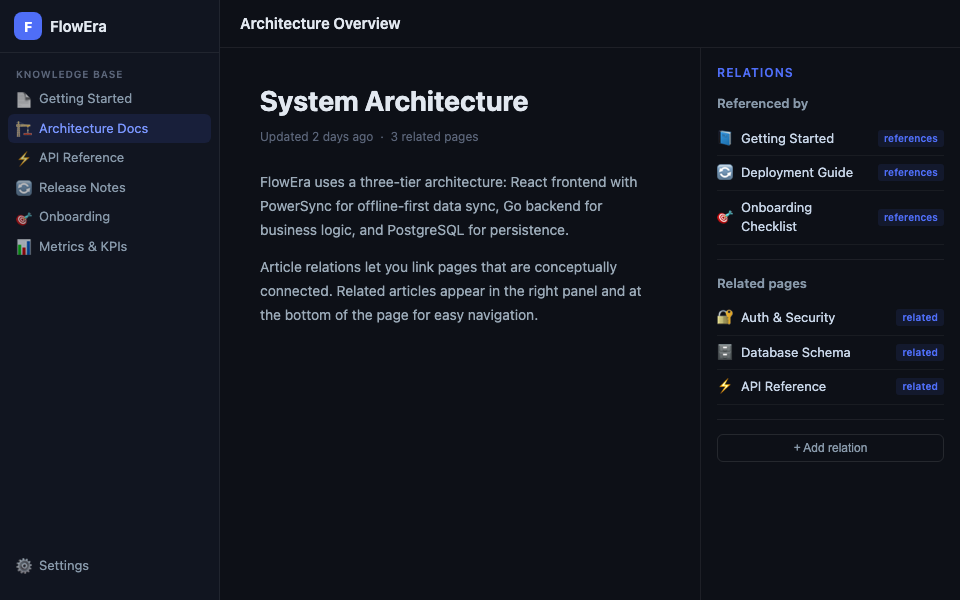
The panel has two sections:
- Referenced by — articles that link to the current one (incoming links)
- Related pages — pages explicitly linked to the current one
Relation Types
| Type | Description |
|---|---|
| references | One article mentions or builds on another |
| related | Articles on similar topics |
| parent / child | Hierarchical connection (alternative to the tree) |
| depends on | One article is only relevant alongside another |
Creating a Relation
- Open the Relations right panel
- Click + Add relation
- Type the page name or select from the list
- Choose the relation type
Relations are bidirectional: when you add a relation on page A, it automatically appears in page B’s panel.
Navigation
Click any related page in the panel to open it. Users can see the web of related topics and explore the knowledge base non-linearly.
Backlinks (Incoming Links)
Beyond explicit relations, FlowEra automatically tracks backlinks — regular text links to the current article from other pages. These also appear in «Referenced by».
Use Cases
API Documentation
API Reference (GET /items)
  ↔ related: REST API Overview
  ↔ references: Authentication Guide
  ← referenced by: Postman Collection
Release Guide
Release Notes v2.1
  ↔ references: Architecture Overview
  ↔ references: Breaking Changes Guide
  ← referenced by: Onboarding Checklist