
FlowEra KB works without internet — you can read and edit cached articles. Changes sync automatically when connectivity is restored.
How It Works
FlowEra uses PowerSync to sync data to a local SQLite database on your device:
- When you first open an article, it’s cached locally
- When connectivity is lost — articles still open from local cache
- Edits are saved locally
- When connectivity returns — changes sync automatically
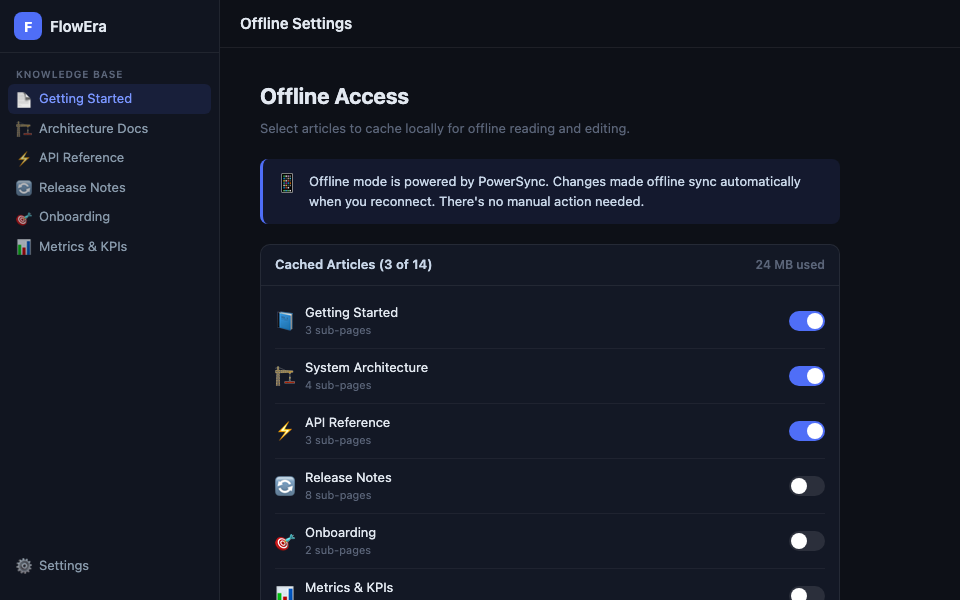
Configuring the Cache
Choose which sections are always available offline: KB Settings → Offline Access → enable the toggle for the desired sections.
Enabled sections are cached in the background during each sync.
Status Indicator
The app status bar shows the connection indicator:
- 🟢 Synced — all data is current
- 🟡 Syncing — sync in progress
- 🔴 Offline — no connection, working from cache
Offline Editing
All editing operations are available in offline mode:
- Creating, editing, deleting articles
- Adding blocks and formatting
- Changes to the page tree (creating, renaming)
Not available offline:
- Uploading new images (cached images are viewable)
- AI assistant
- Comments (load on next sync)
Conflict Resolution
If you and another member edited the same article offline, on sync the system:
- Automatically merges changes in different blocks
- For conflicts in the same block — keeps both versions with a «Conflict» label
- Shows conflicting locations for manual resolution
Cache Storage
| Plan | Offline cache |
|---|---|
| Free | 50 articles |
| Team | Unlimited |
| Enterprise | Unlimited |
Current cache size: KB Settings → Offline Access → «X MB used».
Images are only cached for articles with offline access enabled. To save space, you can disable image caching in settings.